More than one way to skin a snake
Multi-paradigm programming languages can sometimes be thought of as funny social experiment that tests the boundaries of human tendencies to hack around problems that they have created themselves. Throw in also no static typing and you obtain a perfect whirlwind of chaos from which both masterpieces and disasters can emerge.
The complete singularity of entropy happens when You can leverage aspects of metaprogramming due to the interpretative nature of the language. Not knowing for 100% the behavior of the code at runtime can be a little bit scary but when proper measures are taken - such as isolating the closures of dynamically compiled code - it can be a powerful tool to create flexible frameworks that can adapt to the data they are fed.
Python checks all of those marks and, given the fact that it is my main language used during professional work, I have decided to take a stab at using reflections and introspection to create a dynamic, self-modifying code. This being said, for projects like this, You first need to come up with a problem, since You know the "tools" (or in this case techniques) that You want to use. So ...
Wild problem appears!

Kubernetes. I know, seems random, but one of the main things that I like about how objects are defined and maintained within it is the declarative nature of the configuration files. You start with a manifest that says which resources are to be present in Your cluster in the form of YAML files and then You apply them.
Today, a majority of technological stacks that are based on Kubernetes architecture are using Helm charts to manage the deployment of applications. In very short, it allows us to define dynamically spawned objects according to some template that is then populated by values that must adhere to the resource schema. These collections of templates can be then versioned as charts and maintained in a repository by developers.
Here, the pattern that I want to shamelessly copy and advertise as a burning issue in my Python tooling is some kind of module/tool that allows to define schemas for data structures such as configurations files, data models, by use of YAML manifests (or any other format that can be easily parsed) that can be easily versioned and maintained in a repository. This hypothetical tool should be able to generate Python classes that can be used to create instances of those data structures and validate the input data against those pre-defined rules.
Which is Pydantic, right?
Yes and no. Pydantic is a great library that allows You to define data models in Python and validate them against the input data. It also allows You to serialize and deserialize those models to and from JSON.
However, these JSON schemas do not contain information about one of the most flexible aspects of data validation - the custom validators, which can be defined programmatically in the Python code. So that is one of the issues that I want to tackle.
Being on the topic of allowing custom validators, I want their definitions to be as flexible as possible, while remembering that somebody can use a cheeky eval to inject some malicious code into the system or shutil.rmtree to delete the whole filesystem.
Also, when You dump a Pydantic model to JSON, the schema is often not very human-readable and it is not easy to maintain it in a repository. I want to structure my schema definitions in such a way, that a maintainer can easily see which fields are required, which are optional, which have default values, which are of a specific type and which are basically nested schemas themselves. Additionally, YAML has a couple of nice tricks up its sleeve such as anchors and references that can be used to define a schema in a more DRY way.
How it do?
First, of all, we need to investigate for a moment how Pydantic models can be serialized and inspected during runtime. For a quick example, let's take a look at the following notebook:
from pydantic import BaseModel

class Particle(BaseModel):
    id: int
    mass: float
    charge: float | None = None

if __name__ == "__main__":
    p = Particle(id=1, mass=12.5, charge=-1.0)
    # Basic runtime "introspection" / inspection examples
    print("__dict__ =", p.__dict__)
    print("fields: ", list(p.__fields__.keys()))  # pydantic model config
    print("annotations:", Particle.__annotations__)
Here, we have used one trick that is very useful when planning to use Python for metaprogramming - inspection. It is a universal "tactic" that can be utilized to understand the structure of the objects that are being created by our code and, in turn, gain an insight into how we can mimic it later via some custom factories or builders.
In the notebook above, we have defined a simple Pydantic model and then we have used the most basic inspection tool, which is the __dict__ attribute of the class instance. This attribute contains all the fields that are defined in the created object and can be used to extract the information about the fields that are present in the model.
One caveat is the fact that each class in Python is secretly a descendant of the object class and has a lot of attributes that are not directly related to the fields that are defined in the model. If You really want to check out attributes that are related only to the definition of the new class, You need to filter out fields present in the object type
How? You can take the entries present in the __dict__ attribute of the class and filter out the ones that are not present in the object class. This can be done by comparing the __dict__ attribute of the class with the __dict__ attribute of the object class and then extracting the fields that are present in the first one but not in the second one.
The other thing that we have used is the __annotations__ attribute of the class, which contains the type hints that are defined for the fields of the model, but in general applies to any class that has type hints defined for its attributes.
One of the tricks connected with the __annotations__ attribute is that if its value is empty we can be pretty sure that the module that contains the imported class is untyped (and probably the whole imported code).
Also, one of the most popular ways to use inspection in Python code is to utilize statements or methods that are of "is A of B type?", such as isinstance or issubclass. These can also be in form of straight assertions like: assert variable is None.
In short - inspection allows us to investigate the resulting form of data structures that are created during runtime due to application of various protocols - such as the Pydantic model creation or any set of functions, really.
Machines that build machines
This approach may lead us to further abstractions that try to encapsulate these processes in a more dynamic way that is dependent on the shape of data arriving to us at runtime.
One of the ways in which we can look at this is the factory pattern, which is a design pattern that allows us to create objects of a pre-defined type according to some input data. This requires us to define, well, a factory - a pure function that takes the input data and returns a desired data structure.
Normally, we declare these factories as static snippets of code inside our application, but what if we could generate them dynamically based on some rules? This is where the metaprogramming comes in. We effectively want to create the creators - all in response to the data that we are fed.
But what do we know acts as a factory and is related to the topic of this article?
That's right - Pydantic model classes. They are factories that create instances of data structures that are defined by the schema that we have provided to them. Moreover, Pydantic allows us to dynamically generate those classes by using the create_model function that is present in the pydantic module.
from pydantic import BaseModel, create_model, validator

def must_be_positive(v: int) -> int:
    assert v > 0, "value must be > 0"
    return v

DynamicModel = create_model(
    "DynamicModel",
    name=(str, ...),
    count=(int, 1),
    __base__=BaseModel,
    __validators__={
        "count_positive": validator("count", allow_reuse=True)(must_be_positive)
    },
)

print(DynamicModel(name="demo", count=3))
Distilling the above snippet from the Pydantic documentation, we can see that the most important arguments to the create_model function are:
model_name- the name of the model that we want to create, because we would like to have a way to reference it later in our code.field_definitions- the definitions of the fields that are present in the model, which are passed as keyword arguments to the function, because... that is the schema that we want to validate against!__validators__- the custom validators that we want to apply to the fields of the model, because we want to have a way to define custom validation rules for the fields that are present in the model.__base__- this may come in handy if we prepare some custom base class for our models (spoilers: we will).
So, our simplified factory function that creates Pydantic models based on the schema that we provide to it could look something like this:
from pydantic import BaseModel, create_model
from typing import Any, Dict, Tuple, Callable

def build_model(model_name: str, schema: Dict[str, Tuple[Any, Any]], *, validators: Dict[str, Callable] | None = None, base: type[BaseModel] = BaseModel) -> type[BaseModel]:
    """Factory that converts a schema mapping into a dynamic pydantic model.

    schema: { field_name: (type, default or Ellipsis) }
    validators: optional mapping { validator_name: pydantic validator function }
    """
    kwargs: Dict[str, Any] = {"__base__": base}
    if validators:
        kwargs["__validators__"] = validators
    return create_model(model_name, **schema, **kwargs)

User = build_model(
    "User",
    {
        "id": (int, ...),
        "email": (str, ...),
        "is_active": (bool, True),
    },
)

print(User(id=5, email="somebody@example.com"))
And what do we mean by "some magic here"? Well, we need to transform the schema that we have defined in the YAML file into a format that can be passed as keyword arguments to the create_model function. In other word - we want to transpile YAML into appropriate Python objects.
Snakespeak
We need to treat our target schema as a tree that can be traversed and whose leaves can be transformed into the fields (and their properties) of the Pydantic model. This tree can be represented as a nested dictionary, where the keys are the names of the fields and the values are the properties of those fields.
But it would be difficult to define the rules of such transformations without knowing the shape of building blocks we want to produce. We have already simplified the process of creating Pydantic models to a single function call, so it is time to look into the structure (i.e. types) of the arguments that we need to pass to this function.
P.S. We will skip the model_name, because well ... it is a string.
To protect and validate
Why start with validators? Well, it is the most hardcore topic out of all the target properties, so it is better to get it out of the way first.
The way in which validators are created in Pydantic is rather simple - they are just functions that take the value of the field as an argument and return the value if it is valid or raises a ValidationError if it is not.
In practice - You can achieve this by using the @validator or @field_validator decorator on a method that is defined in the model class.
from pydantic import BaseModel, field_validator  # Pydantic V2

class MyModel(BaseModel):
    field: str

    # This is Pydantic V2 validator
    @field_validator("field")
    @classmethod
    def validate_field(cls, value):
        if value != "valid":
            raise ValueError("Field is not valid")
        return value
The structure of the field validator functions is rather simple, but there is one caveat - Pydantic validators can have different signatures depending on the mode in which they are to be run.
By mode, we effectively mean when the function will be run - before or after Pydantic runs its validation methods, and in "wrap" mode, which basically means that Your method becomes a context manager that can be used to wrap the validation logic.
The signature of the function that is used as a validator is as follows:
For before mode: the function must be a class method that takes the class as the first argument (cls) and the value of the field as the second argument.
For after mode: the function must be an instance method that takes the instance of the model as the first argument (self) and the value of the field.
In both cases, the name of the function does not matter. Also, the name of the parameter representing the value is flexible, but it must be the second one in the signature.
Generalizing this pattern, we can show it as the following template:
@field_validator({{ field_name }}, mode="{{ mode }}")
{{ '@classmethod' if mode == 'before' else '' }}
def validate_{{ field_name }}(
    {{ 'cls' if mode == 'before' else 'self' }},
    value
):
        {{ Optional setup? }}
        {{ Validation code }}
        return value
As crazy as it sounds, we can use this template to generate the source code for Pydantic validators based on the incoming input data. Since we want to get this information from YAML files, we can define the structure of the validators in the following way:
validator:
  mode: before
  source: |
    if value != "valid":
        raise ValueError("Field is not valid")
The plan is to inject the source field into the template (while also replacing the appropriate markers with information about the validated field etc.), compile the resulting string into a function and attach it to the model class. This will be done during the runtime for each field in the schema that has the validator defined.
This strategy of dynamically generating executable code based on the input data is a powerful tool that can be used to create flexible frameworks that can adapt to the data that they are fed. The "name of the game" is reflection, a term that can also be found being used to a great extent in the Java world.
However, it is a very dangerous tool that can be used to create security holes, mainly because it allows us to execute arbitrary code during the runtime of the application. Luckily, Python has some built-in mechanisms that can be used to prevent the execution of malicious code.
Reflect. Adapt. Overcome
If only there was a built-in Python module that could be used to compile source code of functions during runtime, preferably using only STL of the language.
Well, there is one trick, but it uses a forbidden technique (which is even considered a linting error by some of the linters) - the exec function. This function allows us to execute arbitrary code during the runtime of the application, but it is considered a security risk because it can be used to execute malicious code. BUT, we will try to isolate the scope of the executed function as much as possible, while also preventing the use of unwanted libraries.
These forbidden modules will be:
os- because it allows us to interact with the operating systemshutil- because it allows us to manipulate the filesystemsubprocess- because it allows us to execute shell commandspickle- because it allows us to serialize and deserialize Python objectstempfile- because it allows us to create temporary files (seeos)importlib- because it allows us to import arbitrary modulespydoc- because it allows us to access the documentation of the modules (and create types!)inspect- because it allows us to inspect the code that is being executedshlex- because it allows us to parse shell-like syntax
The choice of these modules was inspired by a great blog post by Simon de Vlieger (supakeen) on possible exploits about dangers in Python's STL.
But how we can effectively block access to these modules? First of all, whatever we do could be easily circumvented by importing them back in the code that is being executed. So, we need to check the validator source code for any import statements accompanied by the name of the forbidden module and explicitly raise an error if such a statement is found.
def check_for_forbidden_imports(source: str) -> None:
    if any(
        any(
            pattern in source
            for pattern in [f'import {module}', f'{module}.']
        )
        for module in BLOCKED_MODULES
    ):
        raise ForbiddenModuleUseInValidator()
If the code passes this first guard check, we can proceed to introduce another security measure - shadowing of the blocked modules, by effectively replacing their "values" with some dummy objects that will raise an error if they are accessed.
Wait, modules are objects in Python? Yes, they are! And they can be replaced by any other object that has the same attributes and methods as the original module. This is a technique that is often used in testing to replace some external dependencies with mock objects. Here, instead of mocking, we are "nulling" the modules, making them useless.
So, we can introduce a "null" module using the constructor from the types Python library, which allows us to create new types during the runtime of the application. The type we are interested in is the ModuleType type, which is used to represent modules in Python.
Knowing that the resulting modules will be plain-old Python objects, we can overwrite the __getattr__ dunder method of the ModuleType class to raise an error if anything inside the module is accessed. This will notify us that the code is trying to access the forbidden module.
from types import ModuleType

class NullModule(ModuleType):
    def __getattr__(self, *args, **kwargs):
        raise ForbiddenModuleUseInValidator()

NULLIFIED_MODULES = {
    module: NullModule(module)
    for module in BLOCKED_MODULES
}
As You can see, we have created a map that will be used to replace the forbidden modules with the null modules. But where it can be used? Well, there is one trick we can use, that will also leverage the ModuleType as a "container" for the global scope of the executed code.
We can first generate a temporary module for which we will redefine globals dictionary (another cool method for inspection btw, together with locals) that will be used to execute the source code of the validator. Effectively, this compiled function will inherit the mutated global scope of the module in which it is being defined, so it will not have access to the forbidden modules.
from types import ModuleType

def compile_validator_function(validator_source: str, validator_name: str) -> Callable:
    module = ModuleType("validator_module")
    module.__dict__.update(NULLIFIED_MODULES)
    exec(validator_source, module.__dict__)
    return getattr(module, validator_name)
But one second - I am talking about compilation and execution interchangeably in the context of this article, but these are completely two different things. So, compilation here must have a different meaning than the one that is commonly used in the context of programming languages. Which is true.

When I say that the validator functions are "compiled", what I really mean is that the functions are being dynamically defined, due to the fact that any statement that is being executed by the exec function is being interpreted by Python.
So, by passing a snippet that has a function definition, we are effectively creating a new function in the global scope of the module. If the function source code is also injected on the fly, what happens is that we are sort of gluing together a new function, using the interpreter as a "compiler".
This is a very powerful the technique that can be used to create flexible "function factories", but - as You can see by the need to shadow critical modules - is open to abuse.
How this function can be transformed into a validator that can be attached to the Pydantic model? Well, we have to reflect (hehe) on what decorators really are in Python - they are just functions that take a function as an argument and return a function that is a modified version of the original one.
This means that we can use the field_validator decorator as a function call, that will take any arguments available for the Pydantic decorator, and then the result of this call will be called itself with the function that we have compiled as an argument.
def compile_validator(
    field_name: str,
    validator_source: str,
    validator_name: str,
    mode: str,
) -> Callable:
    validator = compile_validator_function(validator_source, validator_name)
    return field_validator(field_name, mode=mode)(validator)
And to be honest - that is it. We have created a function that can be used to attach the validators to the Pydantic model based on the schema that we have defined in the YAML file. We can pass those dynamically generated functions to the create_model function as the __validators__ argument and they will be attached to the model during the runtime.
pydantic.create_model(
    ...
    __validators__={
        field_name: compile_validator(
            field_name,
            validator["source"],
            f"validate_{field_name}",
            validator["mode"],
        )
        {{ iterate over the dictionary that has the validators info }}
    }
    ...
)
Having this beast of reflection and introspection in our hands, we can now proceed to a less dangerous part of the schema - the field definitions.
Field-tested field definitions
The field definitions are the most straightforward part of the schema that will incorporate the validators that we have defined earlier. They are just dictionary entries that will contain:
- The type of the field - here we will use the primitive types that are present in Python
- The default value of the field - if it is not present, the field will be considered required
- The validators that are attached to the field - here we will use the validators that we have defined earlier (so we can skip this part)
The name of the field will be just its key in the dictionary, so we can iterate over the dictionary, pass the key as the name of the field and the value as the other field info.
Pydantic requires us to define the fields as annotations, that can be added to the create_model factory function as keyword arguments. There are multiple syntax for the values of those arguments but we will use a tuple that contains two entries:
- The type of the field as a string,
- An instance of the
FieldInfoclass that will contain the default value and the constraints that will be imposed upon the field.
CONSTRAINTS?! Is that what validators are made to do? Well, yes and no. Pydantic has a very handy way to define primitive constraints on the fields that are present in the model, such as:
min_length- the minimum length of the stringmax_length- the maximum length of the stringgt- the value must be greater than the given onelt- the value must be less than the given one
... and so on. For more information, You can refer to the Pydantic documentation.
I have decided to keep this mechanism in my library because it is a very convenient way to use "simple validators", instead of writing a custom one with one if statement inside of it.
So, the function to create such tuples can look like this:
from pydantic import FieldInfo

def create_field_info(field_info: dict) -> Tuple[str, FieldInfo]:
    return (
        field_info["type"],
        FieldInfo(
            default=field_info.get("default", ...),
            **field_info['constraints']
        )
    )
And the final step is to complete out definition of the field within the input schema. I have decided to use the following structure:
field_name:
  type: str
  default: "default_value"
  constraints:
    min_length: 5
    max_length: 10
  validator: |
    mode: before
    source: |
      if value != "valid":
          raise ValueError("Field is not valid")
Another "-ion"
One possible case that 100% will happen during the use of such schemas is the need to define nested schemas. This can be done by defining a field as a dictionary that contains the schema of the nested model. Translating that to the Pydantic model is rather simple - we just need to create a new model from the nested schema and then pass it as the type of the field.
So, the name of this game is recursion. We can simply check if the value read from YAML file contains a keyword that is normally used to define properties of schemas (here it was chosen to be "properties") and if it does, call the transpilation function recursively, using the parsed, nested schema's entry as the input data.
For the sake of simplicity, we can define the schema of the nested model in the following way:
root_schema:
  description: "This is the root schema"
  properties:
    nested_schema:
        description: "This is the nested schema"
        properties:
            nested_field_1:
                type: str
                default: "default_value"
                constraints:
                    min_length: 5
                    max_length: 10
            nested_field_2:
                type: int
                default: 0
                constraints:
                    gt: 0
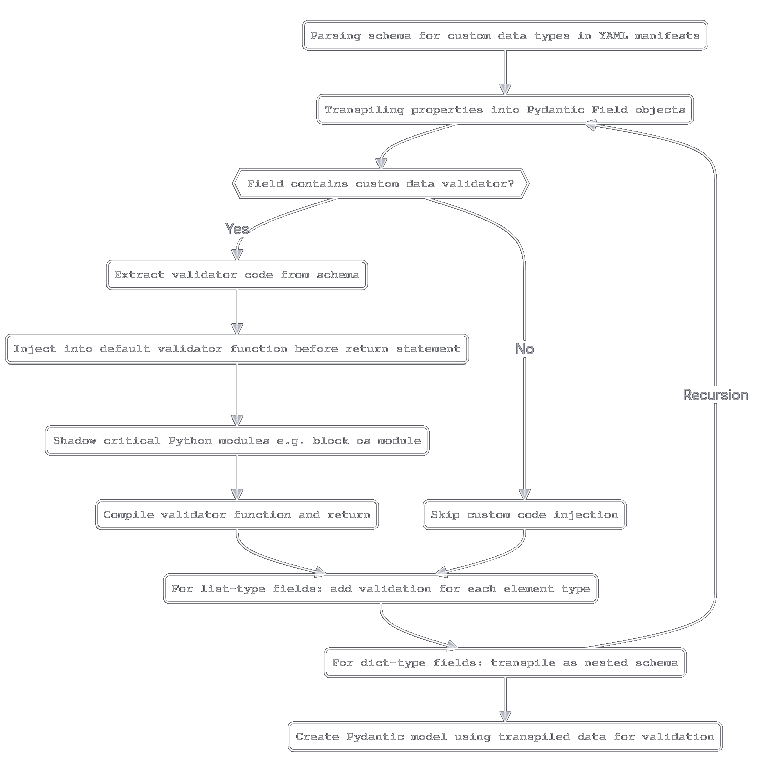
The logic from now on is rather simple:
- Parse the schema from the YAML file
- Check if the schema contains the "properties" keyword
- If it does, iterate over the properties and call the transpilation function recursively
- If it does not, call the function that creates the field info and validator.
- Collect the results of the transpilation and return them as a dictionary that can be decomposed into arguments of Pydantic
create_modelfunction
This workflow can be represented by the following Mermaid diagram:
Snake building its tail
Utilizing the presented ideas, I have created a Python library that allows to define Pydantic models using YAML files. The library is called Phaistos and is available on PyPI. It is still in the early stages of development, but it can be used to define Pydantic models in a more human-readable way.
There are three main components - two functional and one related to the way in which a schema will be represented.
The first object is the Manager, that focuses on collecting available schema definitions and creating Pydantic models from them. This class will be the main "entrypoint" of the library to perform data validation and creation of clean model instances.
class Manager:
    _schemas: dict[str, SchemaInstancesFactory] = {}
    __instance: typing.ClassVar[Manager | None] = None

    def validate(self, data: dict, schema: str) -> ValidationResults:
        return self.get_factory(schema).validate(data)

    @classmethod
    def start(cls) -> Manager:
        # Discover and save the available schemas in the class attribute (_schemas)
        # IMPORTANT: Initialize the Manager and keep its instance in the class attribute (__instance)
        # This will let us use the Manager as a singleton

    def get_factory(self, name: str) -> SchemaInstancesFactory:
        # Return the transpiled model from _schemas cache

    def get_available_schemas(self, path: str = '') -> dict[str, SchemaInstancesFactory]:
        # Check out the directory containing the schemas, transpile each one
        # and return the dictionary of the transpiled models

    def load_schema(self, schema: SchemaInputFile) -> str:
        # A way to manually shove the schema into the manager via YAML input file
The concrete implementation of the functions presented above can be found in the project's repository. What is important is the get_available_schemas method, which is used to discover and create available schemas from the directory that is passed as an argument. This method in practice will keep a map that will contain the names of the schemas as keys and the transpiled models' factories as values.
Encapsulation of transpilation
The Transpiler class is responsible for the transpilation of the schema and mainly uses the procedures and tricks presented in the previous sections. It is a stateless interface that takes in schema definition and spits out the Pydantic model factory.
class Transpiler:
    @classmethod
    def make_validator(cls, prop: ParsedProperty) -> CompiledValidator | None:
        # This method will compile the validator function from the source code

    @classmethod
    def make_property(cls, prop: ParsedProperty, owner: type[TranspiledSchema] | None = None) -> TranspiledProperty:
        # Here we first check out if the property has the 'property' keyword
        # If yes: call the make_schema recursively
        # If not: get the field type, default, constraints and validator (if present)

    @classmethod
    def make_properties(cls, properties: list[ParsedProperty], properties_parent: type[TranspiledSchema]) -> TranspiledModelData:
        # Iterate over the properties and call the make_property method

    @classmethod
    def make_schema(cls, schema: SchemaInputFile, parent: type[TranspiledSchema] | None = None) -> type[TranspiledSchema]:
        # Create a Pydantic model from the schema definition
        # by calling the make_properties method and then decomposing the result
        # into arguments of the create_model function from Pydantic API
What is important here is the make_schema method, which is used to transpile the YAML file and then return an object of TranspiledSchema type that can be used to create the Pydantic model.
Preserving the scripture
This transpiled class is based upon the pydantic.BaseModel class and contains additional class variables and private attributes that are used to hold all validation errors, while allowing both the global and per-field validators to run, overriding the default Pydantic behavior.
This hack can be seen in the __init__ method of the class, where the global validator is run manually before the validate_python method is called by Pydantic on the model instance. So, the main trick is revealed here - the model validator is not created by Pydantic by decorating a function with root_validator/model_validator decorator, but is manually run by the model instance by Phaistos. For nested schemas, the errors are bubbled up to the root schema, so the user can see all the errors at once.
Also, it handles the decomposition of the data returned by the make_properties method into arguments that can be passed to the create_model function from Pydantic API.
class TranspiledSchema(pydantic.BaseModel):
    transpilation_name: typing.ClassVar[str] = ''
    global_validator: typing.ClassVar[
        typing.Callable[[TranspiledSchema, typing.Any], None] | None
    ] = None
    context: typing.ClassVar[
        dict[str, typing.Any]
    ] = {}
    _validation_errors: typing.ClassVar[
        list[FieldValidationErrorInfo]
    ] = []
    parent: typing.ClassVar[type[TranspiledSchema]]

    @property
    def validation_errors(self) -> list[FieldValidationErrorInfo]:
        return self.parent._validation_errors

    @classmethod
    def compile(cls, model_data: TranspiledModelData) -> type[TranspiledSchema]:
        if not model_data.get('parent'):
            cls._validation_errors = []
        schema: type[TranspiledSchema] = pydantic.create_model(  # type: ignore
            model_data['name'],
            __base__=TranspiledSchema,
            __validators__={
                validator['name']: validator['method']
                for validator in model_data['validators']
                if validator
            },
            **model_data['properties']
        )
        schema.parent = model_data.get('parent') or copy.deepcopy(cls)
        cls._rename_schema(schema, model_data['name'])

        schema.context = model_data.get('context', {})  # type: ignore
        schema.global_validator = model_data.get('global_validator')
        return schema

    @classmethod
    def _rename_schema(cls, schema: type[TranspiledSchema], name: str) -> None:
        for field in ['__name__', '__qualname__', 'transpilation_name']:
            if hasattr(schema, field):
                setattr(schema, field, name)

    def __init__(self, **data: typing.Any) -> None:  # type: ignore
        __tracebackhide__ = True

        if self.parent.transpilation_name == self.transpilation_name:
            self.parent._validation_errors = []
        collected_errors: list[FieldValidationErrorInfo] = []

        try:
            if self.global_validator:
                self.global_validator(data)  # type: ignore
        except Exception as validator_exception:  # pylint: disable=broad-except
            collected_errors.append(
                FieldValidationErrorInfo(
                    name=self.__class__.__name__,
                    message=str(validator_exception)
                )
            )
        try:
            self.__pydantic_validator__.validate_python(
                data,
                self_instance=self,
                context=self.context
            )
        except pydantic.ValidationError as validation_error:
            collected_errors.extend([
                FieldValidationErrorInfo(
                    name=str(error['loc'][0]) if error['loc'] else validation_error.title,
                    message=error['msg']
                )
                for error in validation_error.errors()
            ])
        self.parent._validation_errors += self._validation_errors + collected_errors
This approach is very hacky, but it effectively allows us to collectively gather errors from validation of both individual fields and whole models, represented both by the root schema AND nested ones, as seen in the screenshot below:
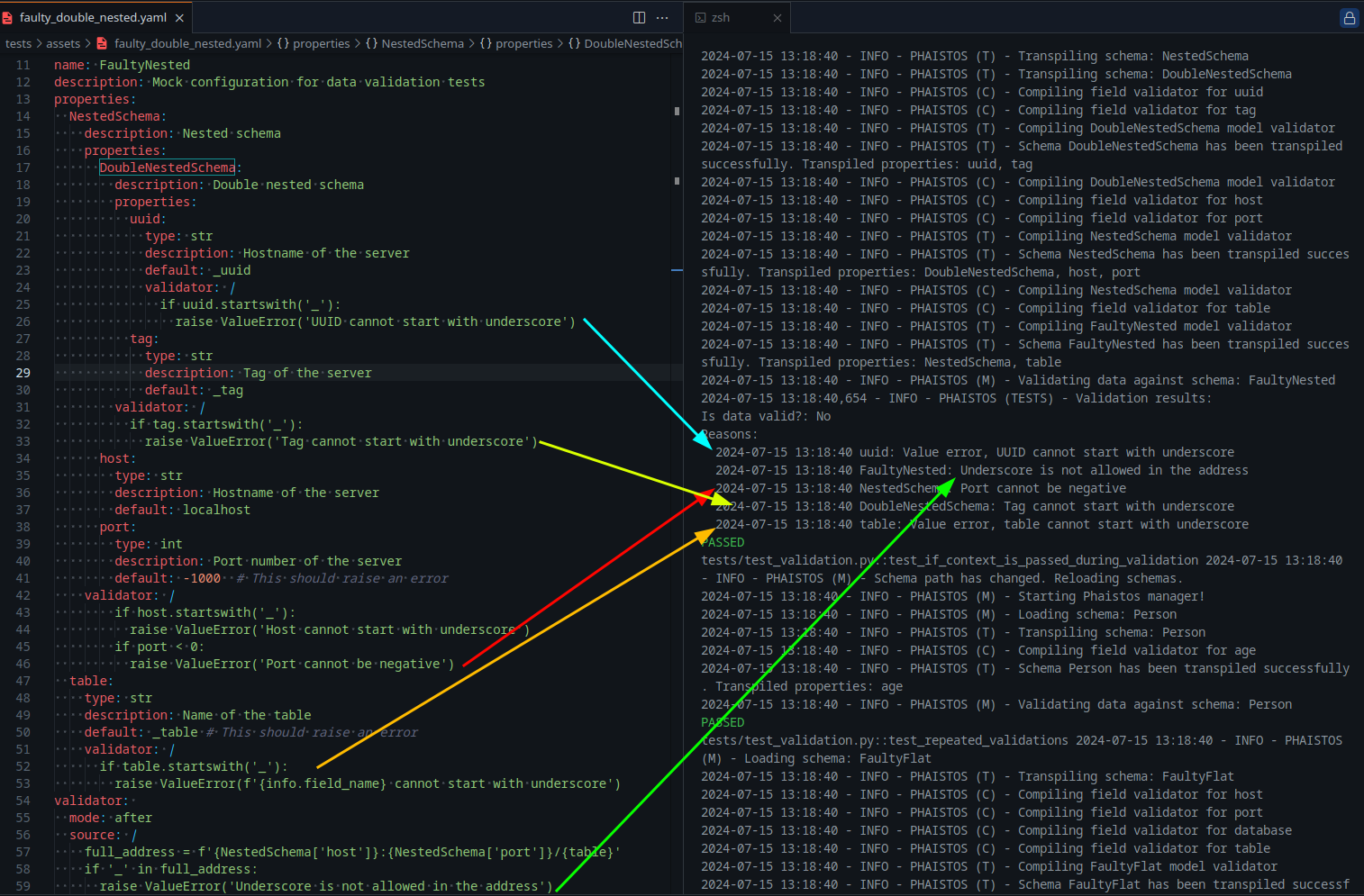
In the above screenshot, I've deliberately set the defaults of some fields to invalid values, so the Pydantic validators will raise an error. The errors are then collected by the Phaistos library and bubbled up to the root schema and that is why they are visible in the output of pytest run.
Also, note that the logs are divided into three types, evident by the mark in the round brackets: (T) is for anything related to transpilation, (V) is for validation errors and (M)'s are the Manager specific logs.
Doting the i's
So, we have out compilation-transpilation mechanism ready, but how can we use it in practice?
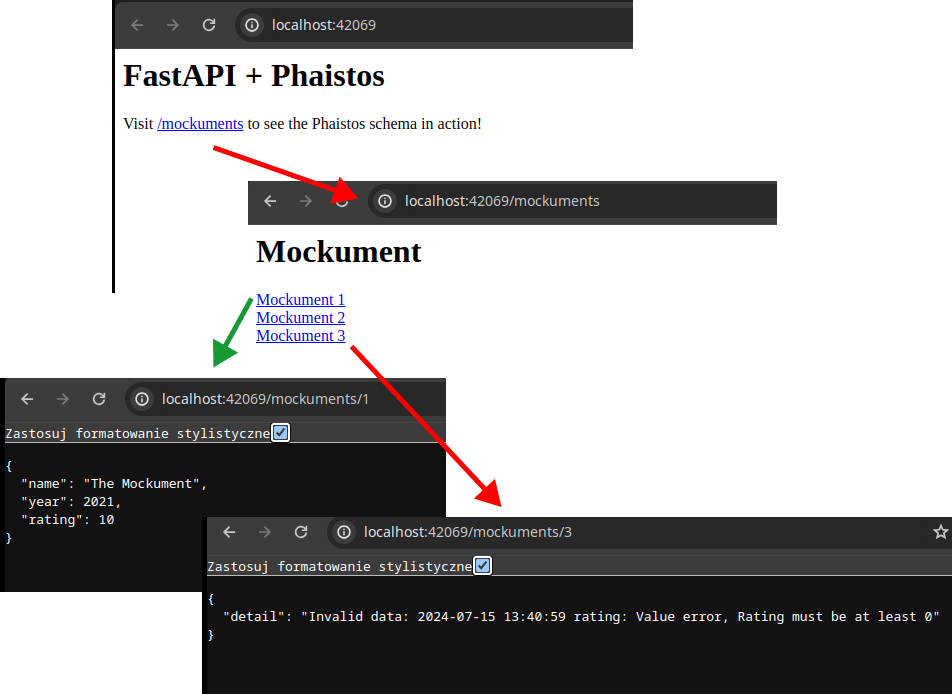
One of the examples of the usage of the Phaistos library can be found in the repo under the examples/ folder and is related to the use of the Phaistos-generated model as response classes in the FastAPI application, leveraging the dependency injection mechanism of the framework.
Basically, we can tell FastAPI to take the query parameters (and of course other data) and pass it through some sort of procedure that will spit out the parameter used by the endpoint code.
In this example application, we have a series of documents (kept in a normal Python dict) that can be accessed by the user by providing the document ID in the query parameters. For the sake of brievity, I will show only the endpoint that is used to get the document by its ID:
@app.get("/mockuments/{mockument_id}")
def get_mockument(
    mockument: typing.Annotated[
        type[phaistos.schema.TranspiledSchema],
        fastapi.Depends(build_mockument_data)  # Inject the built mockument data
    ]
):
    return mockument
All of the meat of this process is located in the referenced build_mockument_data function, that is used to "fetch" (i.e. get the dict entry by key) the document data and then feed it through Phaistos to get either a validated, clean instance of the model or a list of errors that are present in the data:
MOCKUMENTS = {
    1: {
        "name": "The Mockument",
        "year": 2021,
        "rating": 10.0,
    },
    2: {  # This one has no name and the year is in future
        "name": "",
        "year": 2025,
        "rating": 9.0,
    },
    3: {  # This one has only invalid rating
        "name": "The Mockument 3",
        "year": 2023,
        "rating": -1.0,
    },
}

def build_mockument_data(mockument_id: int) -> phaistos.schema.TranspiledSchema:
    if not (mockument_data := MOCKUMENTS.get(mockument_id)):
        raise fastapi.HTTPException(status_code=404, detail="Mockument not found")
    if validated_data := response_model.build(mockument_data):
        manager.logger.info(f"Built mockument data: {validated_data}")
        return validated_data
    manager.logger.info(f"Failed to build mockument data: {mockument_data}")
    raise fastapi.HTTPException(
        status_code=400,
        detail=f"Invalid data: {'; '.join([
            str(error)
            for error in response_model.errors
        ])}"
    )
Running the FastAPI example from the cloned repository will allow You to access the mockuments by their IDs using the /mockuments/{mockument_id} endpoint:
As of right now, I am happy with basic functionalities of Phaistos, but I am planning to add more thingymajigs to it, such as serialization of Pydantic model classes to YAML files (so a reversal of the process that is presented in this article).
I highly encourage You to check out the repository of the project and see how it can be used in practice.
I also hope I have shown You that reflections and introspection can be used to create flexible Python tools that modify and adapt to the data that they are fed. This is a powerful technique that can be used to create dynamic, self-modifying code that can be used to solve complex problems.
I hope You have enjoyed this article and that You have learned something new from it. If You have any questions or comments, feel free to reach out to me on GitHub or LinkedIn.
Thank You for reading and have a great day!